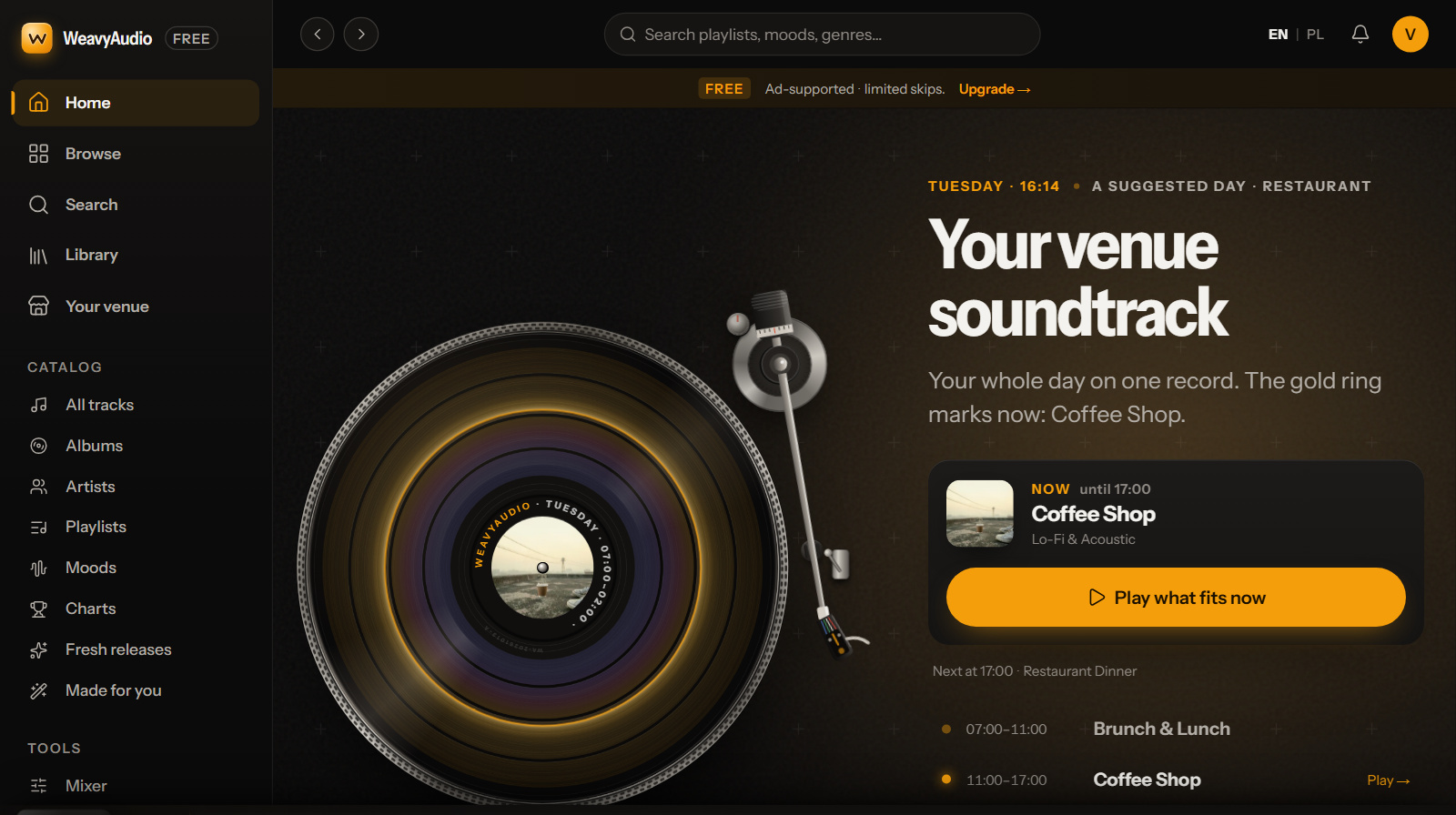
WeavyAudio has a new look. Your day sits on a turntable with a "Play what fits now" button, genres work like a radio, moods sit on a pad, and the schedule has ready weeks for each venue type. The catalog, the license and the price stay the same.
From 11 to 13 October 2026, WeavyAudio got a new look. The new WeavyAudio design brings a new home page, a new start screen and new screens for the jobs you do in a real venue: see what plays now, pick a genre or a mood, find a song and set the music for the week.
WeavyAudio is still a business music app that plays background music for venues: cafés, restaurants, bars, gyms, shops, salons and hotels. The catalog, the license and the price did not change. Here is what is new, screen by screen.
Your venue soundtrack: the day on a turntable
The start screen of the app now opens with a turntable. The record is your venue soundtrack for the whole day, and a gold ring marks "now". Next to it, one card says what is playing, until when and what comes next. In our screenshot it reads "Coffee Shop, Lo-Fi & Acoustic, until 17:00" and "Next at 17:00: Restaurant Dinner".
Under the card is one big amber button: Play what fits now. Press it and music for this hour starts. Below it, the day is a short list: Brunch & Lunch (07:00–11:00), Coffee Shop (11:00–17:00), Restaurant Dinner (17:00–22:00) and Bar & Lounge (22:00–02:00). Each block has a "Play" link.
A "Suggested for" row offers a starting day for a restaurant, café, bar and lounge, shop and boutique, gym, hair and beauty salon, spa and wellness, or hotel lobby. Featured artists, "Your studio" and "Fresh from the studio" are still on the page, now below your day. The idea behind it is dayparting, and our guide to music dayparting for businesses explains it.
Tip: at opening time, press Play what fits now, then check the next block on the card before the rush.
Genres like a radio, moods like a mood pad
The genres page is now a stereo radio receiver. Each genre is a "station" on an FM-style dial. Turn the tuning knob or drag the dial, then press Tune in to play or Open to see the genre. Below the radio, every genre still has a tile. Many names fit venues: Upbeat Retail, Dinner, Workout, Late Night, Morning, Coffeehouse, Spa and Lounge.
The moods page is now a "mood pad", a grid of glowing dots. Height shows tempo: slower moods sit lower, faster moods higher. Left to right runs from dark and bittersweet to bright and warm. The page says plainly that tempo is measured, but the left-to-right place is the team's own placement. Click a mood or drag the puck, and a panel shows its average tempo, its new music this week and the genres filed under it.
Before, both pages were grids of colored tiles. The radio and the pad also show where each sound sits next to the others.
Tip: plan by tempo. Pick moods lower on the pad for quiet hours and higher ones for busy hours.
Search and library: find it, then keep it
Search is now an instrument called Seek, under the title "Find your sound". Type a title, an artist, a genre or a mood. A scale shows where your results land among the genres, and a row of mood lights shows how many fall in each mood. In our screenshot, a search for "house" ends with the chips "Mostly: House, Lo-Fi, Hip-Hop". The old search showed a plain list of results, starting with tracks. Try a mood word, such as "mellow" or "dreamy", when you know the feeling but not the genre.
Your Library is now a wall of records on wooden shelves: songs you liked, albums you saved, what you played recently and artists you follow. A "Record index" card finds a record by title, artist, album or genre, and the "/" key jumps to it. Before, the library was a plain page of lists, such as Liked songs and Favourite artists.
Tip: tap the heart on every track that works in your room. After a busy Saturday, your Liked shelf is a list of songs your guests already accepted.
The track page: see what a song is before you play it
A track page now opens with the cover filling the whole background and a big cover with a record sliding out of the sleeve. Under the title you see artist, genre, mood, language, length, tempo and key, for example "House · Upbeat · English · 3:44 · 122 BPM · G minor". A green dot says "Licensed for venues". Below are synced lyrics with a Karaoke button, other versions of the song, more songs by the artist and similar tracks. The old page showed much of the same, but small.
Why it helps: check tempo, mood and language before a track goes on your list. Read the lyrics too, if families visit your room.
Mixer and schedule: a ready week for your type of venue
The Mixer shapes the live sound: presets (Flat, Bass boost, Vocal, Lo-Fi, Bright), Bass, Mid and Treble sliders, Speed and a loop, including an A–B loop. Every move is drawn on a meter and a response curve. The controls are the same as before, under a new warm brown and amber banner. If your room feels boomy, lower Bass a little and listen. For levels, see our guide on how loud background music should be.
The schedule page changed most. The old page offered one starter template, for restaurants. Now there is a ready week for each kind of venue, built from WeavyAudio venue playlists, and every slot stays editable. Two examples:
- Café: acoustic mornings, a bright lunch and warm evenings.
- Gym: Gym & Fitness from 06:00 to 22:00 on weekdays and from 08:00 to 20:00 at weekends.
"Your week" shows Monday to Sunday with today marked. If two slots overlap, the one higher in the list plays, and a slot past midnight carries into the next morning. The player changes playlist at the end of a track, never mid-song. One thing to know: the music schedule is saved on the device, so the dining room, the bar and the patio can each have their own. Keep the player open in the browser tab.
For ideas, start with music for coffee shops if you run a café. We also have pages for restaurants, bars, gyms, hair salons, retail stores, spas and hotels.
Phone, tablet and browser
The new home page has a section called "Runs on what you already have":
- In any browser: the full catalog, schedules and zones, on a laptop, a desktop or the PC behind the bar.
- On an Android tablet: install it from Chrome and it opens like an app. If the internet drops, it keeps playing the tracks it has saved.
- On your phone: see what every zone is playing, and change a schedule or a filter from wherever you are.
A zone is an area with its own music, and each location includes up to 12 zones. On a phone, the home page also gets full-width "Start free trial" and "Listen to the catalog" buttons.
What did not change
- The catalog. Every track is original and owned by WeavyAudio, and new music arrives every week.
- The license. There are no PRO royalties on our music. Live music, DJs and TV with sound may need licenses of their own. See our license guide and the music license calculator.
- The price. One flat fee per location: $16 a month, or $150 a year ($12.50 a month). Prices are net, in USD, with up to 12 zones included.
- The tools. Filters for clean lyrics, instrumentals and vocal language, gapless playback and a PDF license certificate for your venue.
Try it
Start your 14 days free on the pricing page. No card is required. Or open the catalog and look around first.
FAQ
Did the price or the license change with the new look?
No. The catalog, the license and the price are the same: one flat fee per location, with no PRO royalties on our music.
What do I need to play WeavyAudio in my venue?
A computer, an Android tablet or a phone with a browser, connected to your speakers.
Can each room have its own music schedule?
Yes. Each location includes up to 12 zones, and each zone has its own schedule and filters.
Do I still owe PRO fees if I play WeavyAudio?
Not on our music, which is original and owned by WeavyAudio. Live music, a DJ or TV with sound may need their own licenses.